

- name: Rosette Nebula (NGC 2237)
- location: Monoceros (Unicorn) constellation
- RA: 06hr 31' 36"; DEC: +05º 01' 12"
- distance from Earth: 5,000 light-years
- magnitude: 9.0
- apparent size: 1.3º
About the Rosette Nebula in the Monoceros (Unicorn) constellation
The Rosette Nebula is an emission nebula measuring about 130 light-years in diameter. At its center lies an open star cluster (NGC 2244), whose radiation ionizes the surrounding gas clouds and causes them to emit light. Therefore, the source of the nebula’s glow is this central star cluster. This is why it is classified as an emission nebula. The stars in this cluster formed within the last 5 million years from the material present in the nebula.
Some have compared its shape to a rose, while others see a human skull…
Inside the nebula, numerous dark dust and gas filaments can be observed, commonly referred to as "elephant trunks" (a famous example can also be found in the IC 1396 region in Cepheus).
The brighter central region of the nebula can be observed through a telescope or binoculars from areas with low light pollution. However, this type of target is best suited for astrophotography.
The relatively large size of the nebula makes it a fairly easy target for beginner astrophotographers—provided they use dual-band filters (Ha + OIII) with a color camera, or Ha, OIII, and SII filters with a mono camera. It can also be attempted with a standard DSLR (modified or unmodified).
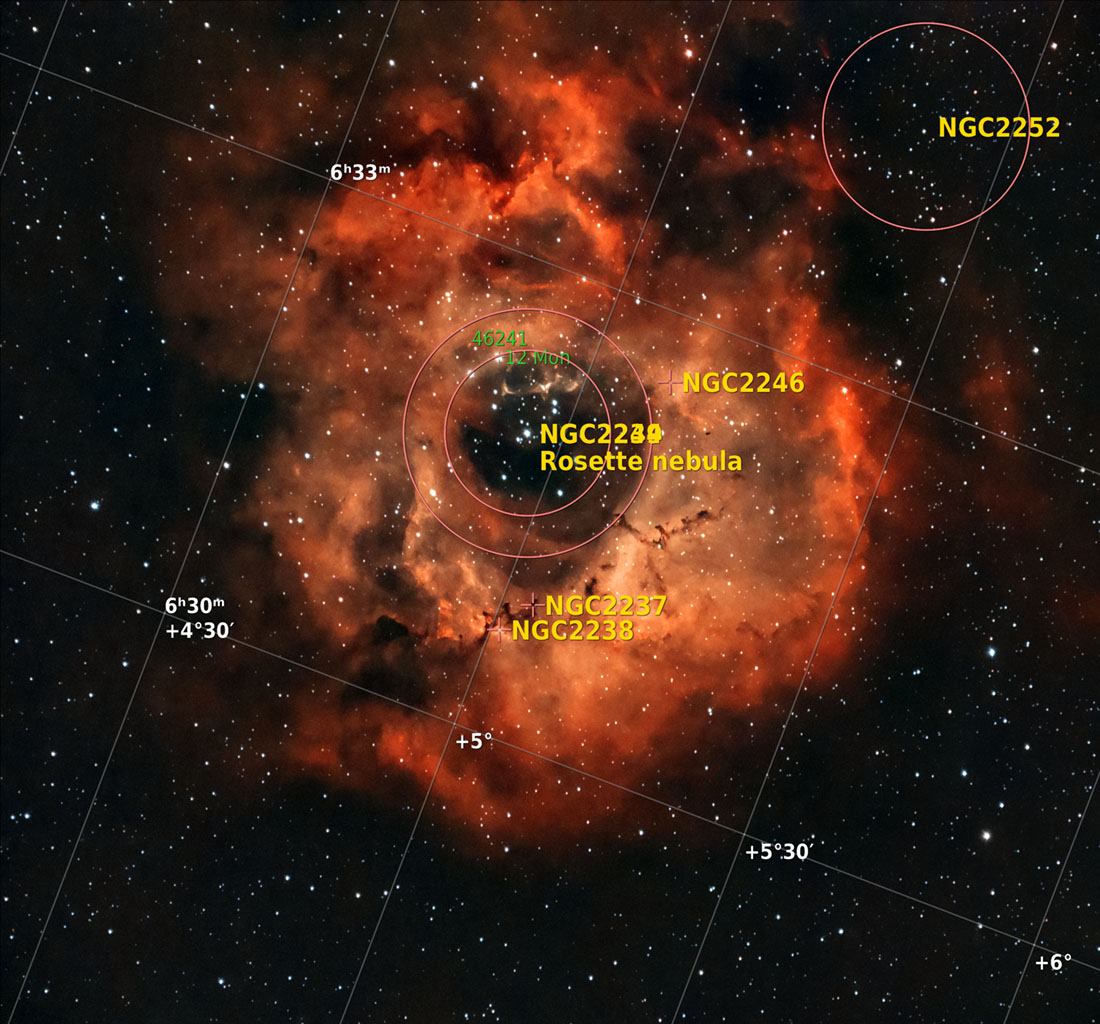
On January 26, 2024, I re-imaged the Rosette Nebula from Otopeni, Romania (Bortle 6–7) with the Moon lighting up the sky like a bulb, being at 100%. Usually, it is said that you should not shoot under a full Moon… but rules don’t always have to be followed. I wanted to take advantage of the clear sky and managed to collect 5 hours of data, along with calibration frames (Bias, Dark, and Flat). I had to refocus twice during the night, probably due to extreme humidity settling on the lens and temperature changes. Some parts of the lens were covered in ice, while others were wet. Still, the two dew heaters did their job.
Image Gallery – Rosette Nebula – January 2024 (5 hours)


Image Gallery – Rosette Nebula – January 2022 (1 hour and 17 minutes)


How to find the Rosette Nebula in the sky
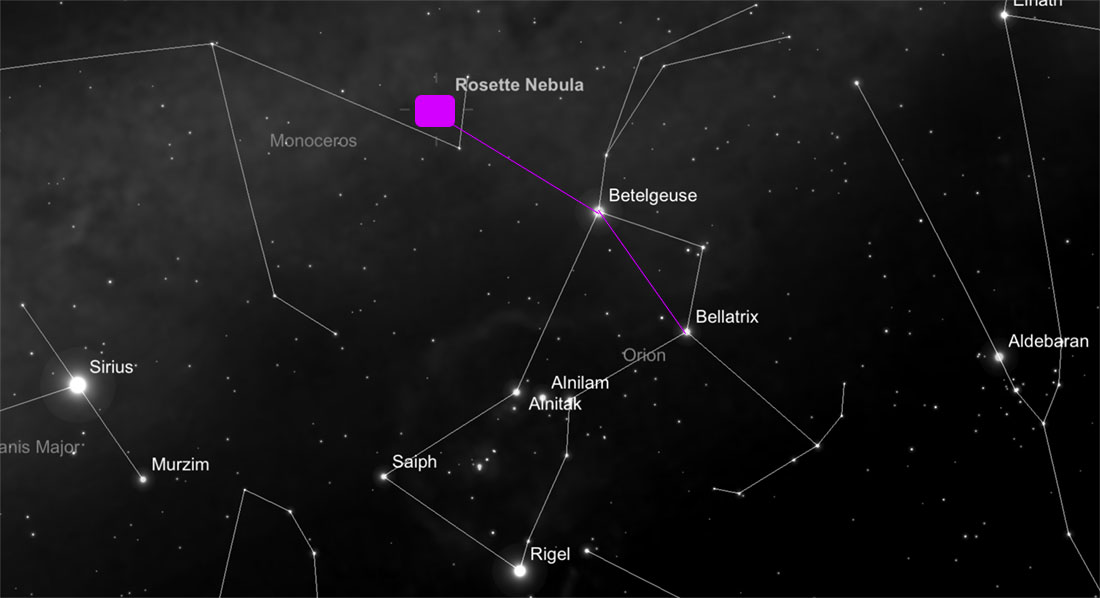
The first step is to identify the Orion constellation in the sky. Then draw an imaginary line between the stars Bellatrix and Betelgeuse, and extend it further with another segment (approximately the same length as the first), slightly downward, passing between two stars in the Monoceros (Unicorn) constellation.
Useful tips for photographing the Rosette Nebula
The optimal period for photographing the Rosette Nebula is winter until around mid-March. I photographed it on March 15 and 19 in 2022, and later again in January 2024. In 2022, I had very limited time (about 1 hour) before the nebula disappeared behind a nearby house. Even so, such a short integration time can still be enough to produce impressive images for a beginner. Of course, to achieve a stronger signal, more than 3 hours of exposure is recommended. In 2024, I collected 5 hours of continuous exposure, and the improvement in image quality is clearly visible.
I photographed the Rosette Nebula near Bucharest under a Bortle 6 sky, initially at 150 mm focal length, then at 300 mm and 400 mm, using a ZWO ASI 533 MC-PRO color camera cooled to -10°C / -20°C and an Optolong L-eXtreme narrowband filter. I used a Sigma 150–600 Contemporary lens for Canon and an iOptron SkyGuider Pro star tracker, which performed reasonably well at 300 mm with 80-second exposures. In 2024, I used an EQ6-R mount.
As usual, the ASIAIR+ acts as the brain of the entire setup, handling most operations: focus checking, identifying the sky position via plate solving (especially useful when using a star tracker like the SkyGuider Pro), camera settings (number of frames, exposure time, gain), and guiding.
I also used a ZWO ASI 120 MM Mini guide camera and a Manfrotto CX PRO3 tripod (for the SkyGuider Pro).
The nebula can be photographed using a color camera with a dual-band filter (Idas, L-eXtreme, ALP-T 2" Dualband 5nm Antlia, etc.), more advanced filters (Radian Triad Tri-Band Narrowband or Radian Triad Ultra Narrowband), or with a mono camera using Ha, OIII, and SII filters.
Processing images of the Rosette Nebula


Single frame (.fit) vs. final processed image
The first step is loading the frames (Light, Flat, Bias, etc.) into PixInsight using Script >> Batch Processing >> WeightedBatchPreprocessing to stack them, after which the software exports a single final frame to work with. I prefer this simpler approach with minimal settings, although more advanced stacking options exist (including within PixInsight). Other software options include DeepSkyStacker (most widely used on Windows), SIRIL (Windows, Linux, and Mac), or Starry Sky Stacker (Mac).
Other steps include:
- Dynamic Crop
- Dynamic Background Extraction (placing points manually)
- Background Neutralization
- SCNR
- BlurXTerminator (default settings)
- Starnet++ to extract the stars from the image; from this point onward, processing is done on the starless image
- Convert the image from linear to non-linear and save it as .TIFF
- Adjustments using color and luminance masks
- Noise reduction – NoiseXTerminator
- For those more comfortable with Photoshop, export the image as .TIFF and continue processing there using Selective Color, Levels, and Adobe Camera Raw (shadows, etc.)
- Finally, in PixelMath, recombine the stars with the starless image using the formula combine (Starless, Stars, op_screen())
- Optionally reduce star sizes
Below you can see several stages:
- a single unprocessed (.FIT) frame captured with the ASI 533 MC-PRO at 80 seconds
- the master frame produced in PixInsight after stacking, unprocessed (gradient clearly visible)
- the processed starless master frame before exporting to Photoshop
- the starless frame further processed in Photoshop
- the final image where the starless and stars-only frames are combined


